
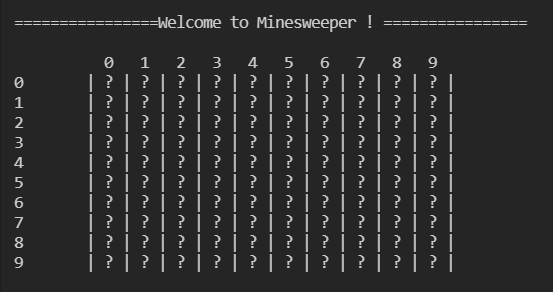
This article contains a step-by-step guide to building a command-line-based Minesweeper game!
If you are a beginner in Java (just like I was when I developed this game) and want some hands-on practice, making a game might be an interesting way to learn! This code is going to be beginner-friendly, so enjoy 🙂
I hope you are familiar with the rules of minesweeper, if not you can check this out first.
Logic
- As we know, Minesweeper consists of a matrix of cells behind which several mines are hidden. And our goal is to find out all the cells that don’t carry the bombs. To make the matrix (or game field) we are going to use two 2D arrays- the first one will contain all the numbers and bombs, and the second one will contain only the data that is to be displayed on the screen.
- The setup and placement of bombs will be done in a randomized fashion.
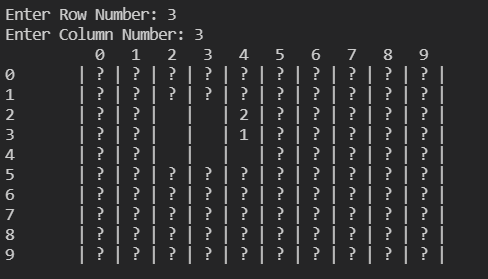
- At each turn, the player/user will be prompted to enter the row and column number. The selected cell will get exposed and if there’s a bomb behind it, the game will be over. If not, the cell’s neighbors will be displayed on the screen, based on which the user can play his next chance.
Let’s Code!
Step 1 — Let’s begin with the creation of a ‘MineSweeper’ class and add the following main function to it. Along with the main function, let us also initialize two 2d arrays as explained in Logic point 1.
import java.util.*;

public class MineSweeper {

private int[][] fieldVisible = new int[10][10];
private int[][] fieldHidden = new int[10][10];

    public static void main(String[] args)
    {
        MineSweeper M = new MineSweeper();
        M.startGame();
    }
}
Every time we run the code, the main method will create an object belonging to the class MineSweeper. This class is going to contain methods and rules that will dictate the game.
Step 2 — Now let’s proceed by adding methods to the game. The first method that you can add is the startGame method.
public void startGame()
    {
        System.out.println("\n\n================Welcome to Minesweeper ! ================\n");
        setupField(1);

        boolean flag = true;
        while(flag)
        {
            displayVisible();
            flag = playMove();
            if(checkWin())
            {
                displayHidden();
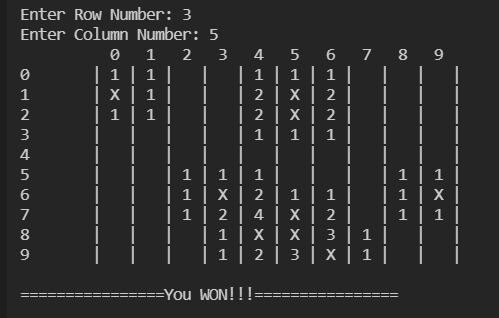
                System.out.println("\n================You WON!!!================");
                break;
            }
        }
    }
This method will:
- Display the entry-level game/introduction messages.
- Setup the minesweeper playfield.
- Run the game until the player wins/loses.
- Display final message.
Step 3 — The setupField method is going to be used to set up the mines in the play-field. Currently, I have set up 10 bombs in the field.
As explained in logic point 2, we will choose random integers from 0–9 for the row and column values and place a bomb on each of those locations.
public void setupField(int diff)
    {
        int var=0;
        while(var!=10)
        {
            Random random = new Random();
            int i = random.nextInt(10);
            int j = random.nextInt(10);
            //System.out.println("i: " + i + " j: " + j);
            fieldHidden[i][j] = 100;
            var++;
        }
        buildHidden();
    }
At the end of this method, we will call buildHidden which will build the hidden matrix.
Step 4 — After the setting up of the mines, we will build our hidden matrix, consisting of the mine proximity neighbor numbers and the mines.
public void buildHidden()
    {
        for(int i=0; i<10; i++)
        {
            for(int j=0; j<10; j++)
            {
                int cnt=0;
                if(fieldHidden[i][j]!=100)
                {

                    if(i!=0)
                    {
                        if(fieldHidden[i-1][j]==100) cnt++;
                        if(j!=0)
                        {
                            if(fieldHidden[i-1][j-1]==100) cnt++;
                        }

                    }
                    if(i!=9)
                    {
                        if(fieldHidden[i+1][j]==100) cnt++;
                        if(j!=9)
                        {
                            if(fieldHidden[i+1][j+1]==100) cnt++;
                        }
                    }
                    if(j!=0)
                    {
                        if(fieldHidden[i][j-1]==100) cnt++;
                        if(i!=9)
                        {
                            if(fieldHidden[i+1][j-1]==100) cnt++;
                        }
                    }
                    if(j!=9)
                    {
                        if(fieldHidden[i][j+1]==100) cnt++;
                        if(i!=0)
                        {
                            if(fieldHidden[i-1][j+1]==100) cnt++;
                        }
                    }

                    fieldHidden[i][j] = cnt;
                }
            }
        }

    }
The logic behind this is pretty simple. We will choose each cell and count the number of bombs present in all of its neighboring cells. This value will be saved in the hidden matrix cell.
Step 5 — Looking back at Step 2, we can now complete the displayVisible method. The goal of this method is to display the current progress of the game to the player (after each move).
public void displayVisible()
    {
        System.out.print("\t ");
        for(int i=0; i<10; i++)
        {
            System.out.print(" " + i + "  ");
        }
        System.out.print("\n");
        for(int i=0; i<10; i++)
        {
            System.out.print(i + "\t| ");
            for(int j=0; j<10; j++)
            {
                if(fieldVisible[i][j]==0)
                {
                    System.out.print("?");
                }
                else if(fieldVisible[i][j]==50)
                {
                    System.out.print(" ");
                }
                else
                {
                    System.out.print(fieldVisible[i][j]);
                }
                System.out.print(" | ");
            }
            System.out.print("\n");
        }
    }
Step 6 — The playMove method will allow the player to select a cell, and expose the selected cell and its neighbors. If the selected cell contains a mine, the ‘Game Over’ message will be displayed. This method will be called after each turn.
public boolean playMove()
    {
        Scanner sc= new Scanner(System.in);
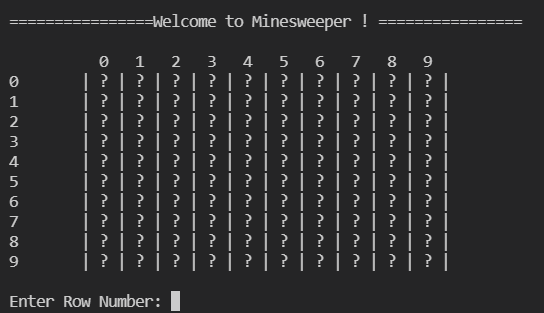
        System.out.print("\nEnter Row Number: ");
        int i= sc.nextInt();
        System.out.print("Enter Column Number: ");
        int j= sc.nextInt();

        if(i<0 || i>9 || j<0 || j>9 || fieldVisible[i][j]!=0)
        {
            System.out.print("\nIncorrect Input!!");
            return true;
        }

        if(fieldHidden[i][j]==100)
        {
            displayHidden();
            System.out.print("Oops! You stepped on a mine!\n============GAME OVER============");
            return false;
        }
        else if(fieldHidden[i][j]==0)
        {
            fixVisible(i, j);
        }
        else
        {
            fixNeighbours(i, j);
        }

        return true;
    }
Step 7 — The next two functions: ‘fixVisible’ and ‘fixNeighbours’ will be useful to change our hidden and visible 2d arrays.
public void fixVisible(int i, int j)
    {
        fieldVisible[i][j] = 50;
        if(i!=0)
        {
            fieldVisible[i-1][j] = fieldHidden[i-1][j];
            if(fieldVisible[i-1][j]==0) fieldVisible[i-1][j] = 50;
            if(j!=0)
            {
                fieldVisible[i-1][j-1] = fieldHidden[i-1][j-1];
                if(fieldVisible[i-1][j-1]==0) fieldVisible[i-1][j-1]=50;

            }
        }
        if(i!=9)
        {
            fieldVisible[i+1][j]=fieldHidden[i+1][j];
            if(fieldVisible[i+1][j]==0) fieldVisible[i+1][j]=50;
            if(j!=9)
            {
                fieldVisible[i+1][j+1]= fieldHidden[i+1][j+1];
                if(fieldVisible[i+1][j+1]==0) fieldVisible[i+1][j+1] = 50;
            }
        }
        if(j!=0)
        {
            fieldVisible[i][j-1]=fieldHidden[i][j-1];
            if(fieldVisible[i][j-1]==0) fieldVisible[i][j-1] = 50;
            if(i!=9)
            {
                fieldVisible[i+1][j-1]=fieldHidden[i+1][j-1];
                if(fieldVisible[i+1][j-1]==0) fieldVisible[i+1][j-1] = 50;
            }
        }
        if(j!=9)
        {
            fieldVisible[i][j+1]=fieldHidden[i][j+1];
            if(fieldVisible[i][j+1]==0) fieldVisible[i][j+1] = 50;
            if(i!=0)
            {
                fieldVisible[i-1][j+1]=fieldHidden[i-1][j+1];
                if(fieldVisible[i-1][j+1]==0) fieldVisible[i-1][j+1] = 50;
            }
        }
    }

    public void fixNeighbours(int i, int j)
    {
        Random random = new Random();
        int x = random.nextInt()%4;

        fieldVisible[i][j] = fieldHidden[i][j];

        if(x==0)
        {
            if(i!=0)
            {
                if(fieldHidden[i-1][j]!=100)
                {
                    fieldVisible[i-1][j] = fieldHidden[i-1][j];
                    if(fieldVisible[i-1][j]==0)  fieldVisible[i-1][j] = 50;
                }
            }
            if(j!=0)
            {
                if(fieldHidden[i][j-1]!=100)
                {
                    fieldVisible[i][j-1] = fieldHidden[i][j-1];
                    if(fieldVisible[i][j-1]==0)  fieldVisible[i][j-1] = 50;
                }

            }
            if(i!=0 && j!=0)
            {
                if(fieldHidden[i-1][j-1]!=100)
                {
                    fieldVisible[i-1][j-1] = fieldHidden[i-1][j-1];
                    if(fieldVisible[i-1][j-1]==0)  fieldVisible[i-1][j-1] = 50;
                }

            }
        }
        else if(x==1)
        {
            if(i!=0)
            {
                if(fieldHidden[i-1][j]!=100)
                {
                    fieldVisible[i-1][j] = fieldHidden[i-1][j];
                    if(fieldVisible[i-1][j]==0)  fieldVisible[i-1][j] = 50;
                }
            }
            if(j!=9)
            {
                if(fieldHidden[i][j+1]!=100)
                {
                    fieldVisible[i][j+1] = fieldHidden[i][j+1];
                    if(fieldVisible[i][j+1]==0)  fieldVisible[i][j+1] = 50;
                }

            }
            if(i!=0 && j!=9)
            {
                if(fieldHidden[i-1][j+1]!=100)
                {
                    fieldVisible[i-1][j+1] = fieldHidden[i-1][j+1];
                    if(fieldVisible[i-1][j+1]==0)  fieldVisible[i-1][j+1] = 50;
                }
            }
        }
        else if(x==2)
        {
            if(i!=9)
            {
                if(fieldHidden[i+1][j]!=100)
                {
                    fieldVisible[i+1][j] = fieldHidden[i+1][j];
                    if(fieldVisible[i+1][j]==0)  fieldVisible[i+1][j] = 50;
                }
            }
            if(j!=9)
            {
                if(fieldHidden[i][j+1]!=100)
                {
                    fieldVisible[i][j+1] = fieldHidden[i][j+1];
                    if(fieldVisible[i][j+1]==0)  fieldVisible[i][j+1] = 50;
                }

            }
            if(i!=9 && j!=9)
            {
                if(fieldHidden[i+1][j+1]!=100)
                {
                    fieldVisible[i+1][j+1] = fieldHidden[i+1][j+1];
                    if(fieldVisible[i+1][j+1]==0)  fieldVisible[i+1][j+1] = 50;
                }
            }
        }
        else
        {
            if(i!=9)
            {
                if(fieldHidden[i+1][j]!=100)
                {
                    fieldVisible[i+1][j] = fieldHidden[i+1][j];
                    if(fieldVisible[i+1][j]==0)  fieldVisible[i+1][j] = 50;
                }
            }
            if(j!=0)
            {
                if(fieldHidden[i][j-1]!=100)
                {
                    fieldVisible[i][j-1] = fieldHidden[i][j-1];
                    if(fieldVisible[i][j-1]==0)  fieldVisible[i][j-1] = 50;
                }

            }
            if(i!=9 && j!=0)
            {
                if(fieldHidden[i+1][j-1]!=100)
                {
                    fieldVisible[i+1][j-1] = fieldHidden[i+1][j-1];
                    if(fieldVisible[i+1][j-1]==0)  fieldVisible[i+1][j-1] = 50;
                }
            }
        }
    }
Step 8 — Now for the second-last step, let’s build the checkWin method. This method will be used to check if the player has evaded all the mines on the playfield.
public boolean checkWin()
    {
        for(int i=0; i<10; i++)
        {
            for(int j=0; j<10; j++)
            {
                if(fieldVisible[i][j]==0)
                {
                    if(fieldHidden[i][j]!=100)
                    {
                        return false;
                    }
                }
            }
        }
        return true;
    }
It will return a boolean value back to the startGame function present in Step 2.
Step 9 — Finally, let’s build the displayHidden method. This method will be called whenever a player loses or wins a game.
public void displayHidden()
    {
        System.out.print("\t ");
        for(int i=0; i<10; i++)
        {
            System.out.print(" " + i + "  ");
        }
        System.out.print("\n");
        for(int i=0; i<10; i++)
        {
            System.out.print(i + "\t| ");
            for(int j=0; j<10; j++)
            {
                if(fieldHidden[i][j]==0)
                {
                    System.out.print(" ");
                }
                else if(fieldHidden[i][j]==100)
                {
                    System.out.print("X");
                }
                else
                {
                    System.out.print(fieldHidden[i][j]);
                }
                System.out.print(" | ");
            }
            System.out.print("\n");
        }
    }
displayHidden will display our hidden 2d array, which will be containing all the mines and mine-proximity neighbor numbers.
Now, you can just save the file, compile the code, execute it and start playing!!
Here is the full code for reference.
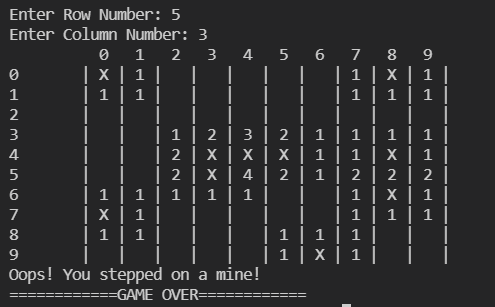
Output
Here are a few output images to get an idea, of how the game will look once compiled and executed.
Future Additions
Although this game is playable, we can add multiple enhancements to improve the logic and the gaming experience. Here are a few suggestions:
- Change the game field according to a difficulty level; the player can be prompted to input a difficulty level according to which the number of mines or the playfield size can be increased.
- Improve the logic so as to improve the gaming experience. There can be a few changes made to increase the logical efficiency of the code. Find them out by playing the game and scrupulously going through the code!
- Think of adding a UI. Currently, this game is to be played on the command line. You can add a nice UI that improves the user experience.
These are just a few suggestions that are clearly noticeable. However, remember that the sky is the limit!
Hope you liked this post! You can find the entire code here:
https://github.com/SohamBhure/Minesweeper



 Soham Bhure
Leave a comment